Drawing a Mandala with the TikZ Package in LaTeX

This article analyzes the aesthetics of a TikZ mandala and provides a detailed explanation of its code structure, covering visual philosophy, mathematical analysis, and technical exploration.
1 Introduction
A mandala is a visual representation of balance, unity, and harmony.
In scientific graphics, LaTeX with the TikZ package is a powerful tool for producing precise geometric figures, including complex mandala patterns.
This article combines two perspectives: an aesthetic analysis and a technical, line-by-line breakdown of the TikZ code that generates the mandala.
The goal is to help readers appreciate both the artistic and mathematical logic behind this mesmerizing design.
2 LaTeX Source Code
\documentclass[tikz,border=5]{standalone}
\usetikzlibrary{fadings}
\begin{tikzfadingfrompicture}[name=mandela]
\tikzset{%
  filled/.style={%
    fill=pgftransparent,
    draw=pgftransparent!0,
  },
  line join=round,
  doubled/.style={
    double=pgftransparent,
    double distance=#1,
  },
  doubled/.default=1.5}
... (full code as in the original article) ...
\end{tikzfadingfrompicture}
\pgfdeclareradialshading{mandela}{\pgfpointorigin}{%
  color(0cm)=(yellow);
  color(0.2cm)=(red);
  color(0.4cm)=(purple);
  color(0.6cm)=(blue);
  color(0.8cm)=(cyan);
  color(1cm)=(cyan)}
\begin{document}
\begin{tikzpicture}
\shade [shading=mandela, path fading=mandela, fit fading=false]
  (-6,-6) rectangle (6,6);
\end{tikzpicture}
\end{document}
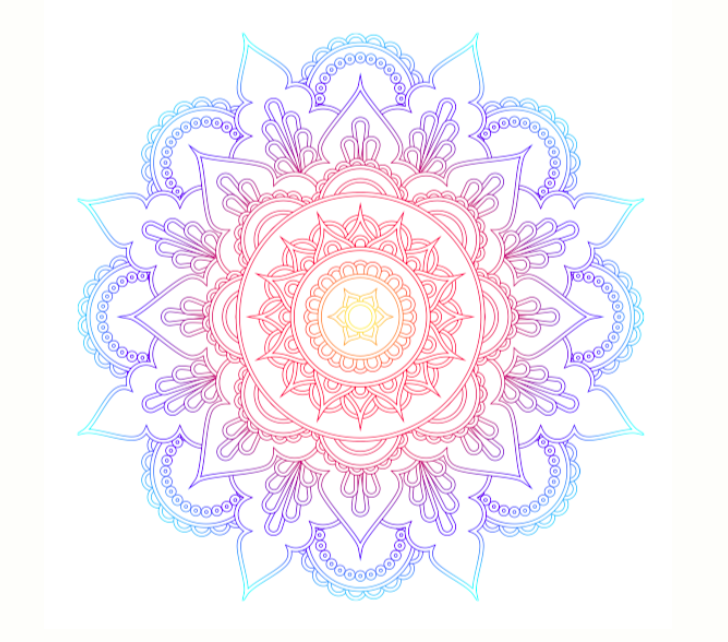
The output produced:
3 Detailed Code Structure Explanation
3.1 Declaration and Libraries
The code begins with the standalone class to output a self-contained image.
The fadings library enables gradual transparency effects (masking).
3.2 Defining the Fading Picture
\begin{tikzfadingfrompicture}[name=mandela] defines an internal picture used as a mask.
All shapes inside this block define the area where the color gradient will be applied.
3.3 General Style Configuration
- filled: marks transparent fill areas.
- doubled: draws double transparent lines.
- line join=round: smooths curve intersections.
Here, pgftransparent controls transparency rather than color.
3.4 First Radial Pattern (16 Segments)
The first loop \foreach \i in {0,2,...,15} draws circular clusters every 22.5°, forming a flower-like pattern around the center.
Each segment includes:
- A main circle of radius 1.
- 20 small circles around radius 1.
- 24 small circles around radius 6/8.
This creates layered petals forming the outer mandala ring.
3.5 Complex Petal Pattern (Odd Iterations)
The second block \foreach \i in {1,3,...,15} draws the main petals:
- Combines
arcandBézier curvesfor smooth shapes. rotatealigns petal direction.scale=-1flips the coordinate system for symmetry.(a)stores temporary coordinates for curve closure.
Nested loops \foreach \j in {0,1,-1,...} add micro details around each petal for richer texture.
3.6 Middle Layers (Radius 2 and 9/4)
Using evaluate within \foreach, this layer calculates each angle \k dynamically to build intermediate petal structures between inner and outer rings — adding smooth radial transitions.
Concentric Inner Circles
Three circles with radii 3/4, 1/2, and 1/4 are drawn, along with small dots around them, giving depth to the mandala core.
3.7 Outer Layer and Additional Texture
Block \path [filled, doubled] circle [radius=9/4]; draws the outer boundary.
A loop of 32 larger dots at radius 6/4 forms a luminous ring of points around the mandala.
3.8 Final Details and Mask Closure
Smaller Bézier paths add textural highlights near the center. Finally, \end{tikzfadingfrompicture} closes the mask definition.
3.9 Color Shading Definition
\pgfdeclareradialshading defines a color gradient from yellow at the center to cyan at the edges — breathing life into the masked geometry.
3.10 Applying the Shading to the Mask
\shade [shading=mandela, path fading=mandela, fit fading=false]
  (-6,-6) rectangle (6,6);
This command draws a 12×12 rectangle filled with the mandela gradient and shaped by the fading mask, revealing the full mandala in radiant color.
4 Visual and Philosophical Analysis
The resulting mandala expresses geometric harmony:
- Center: symbolizes focus and awareness.
- Middle layers: represent expanding energy and growth.
- Outer layers: reflect the universal symmetry of balance.
The gradient from yellow to blue symbolizes a spiritual journey — from awareness (yellow) to tranquility (blue). Its radial symmetry reflects both the order of nature and the mathematical beauty of balance.
5 TikZ Experimentation and Variations
- Change the gradient colors:
color(0cm)=(white);
color(0.4cm)=(magenta);
color(1cm)=(black);-
Add organic randomness: use
rotate=rand*360inside some loops. -
Soft shadows:
\usetikzlibrary{shadows.blur}
\tikzset{every path/.append style={blur shadow}}
```4. **Animate:** use the `animate` package to visualize the mandala forming gradually.

---
6 Scientific and Artistic Relevance
-
Scientific aspect: demonstrates parametric graphics, coordinate transformation, and symmetry in mathematics.
-
Artistic aspect: showcases how logic and geometry merge into visual poetry.
TikZ mandalas are useful for:
-
Geometry visualization and research.
-
Illustrating mathematical symmetry.
-
Generative art inspired by computation.
7 Conclusion
This LaTeX code is a shining example of how algorithms can create aesthetics. With TikZ, mathematics transforms into visual expressions filled with philosophical and artistic depth.
A deep understanding of its structure opens endless possibilities for computational art and scientific visualization.
8 References
- Tantau, T. The TikZ and PGF Manual, Version 3.1.10 (2024).
- Wolfram Research, Radial Symmetry in Geometry and Art.
- Triono, Aan. Eksperimen Estetika dengan TikZ: Dari Fraktal hingga Mandala.
- Snyder, J. (2022). Mathematical Patterns in Sacred Geometry.
Written by: Aan Triono Aan Triono
License: CC BY-SA 4.0