The Circle Illusion: The Perceptual Phenomenon of Size Around a Central Circle

This article discusses the circle illusion, where two identical central circles appear different in size due to surrounding visual context. Built with LaTeX TikZ, this article provides a complete explanation of the code structure and perceptual science behind it.
1 Introduction
In the realm of visual perception, the human brain often processes size relatively rather than absolutely.
One of the most well-known examples of this is the Ebbinghaus Illusion, or Circle Illusion, in which two identical circles appear to be of different sizes due to the surrounding shapes.
This article demonstrates the phenomenon using LaTeX TikZ, providing a detailed explanation of each code component and the scientific concept behind it.
2 LaTeX Source Code
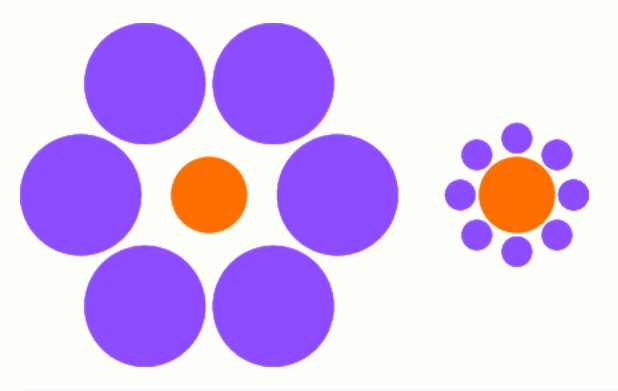
Below is the complete LaTeX code to generate two orange central circles that appear different in size due to variations in the surrounding blue circles.
\documentclass{standalone}

\usepackage{tikz}

\begin{document}
\begin{tikzpicture}[baseline=(X.base)]
    \node[circle,fill=orange,draw=orange,minimum size=2cm] (X) at (0,0) {};
    \foreach \i in {0,60,...,330}{
        \filldraw[blue!50!white]  (\i:3.4) circle (1.6);}
\end{tikzpicture}
\hspace{1cm}
\begin{tikzpicture}[baseline=(X.base)]
    \node[circle,fill=orange,draw=orange,minimum size=2cm] (X) at (0,0) {};
    \foreach \i in {0,45,...,360}{
        \filldraw[blue!50!white]  (\i:1.5)  circle (.4);}
\end{tikzpicture}
\end{document}
The output produced:
3 Explanation of the Code Structure
3.1 Document Declaration
\documentclass{standalone}The standalone document class ensures that only the drawing is rendered—no page margins, headers, or text.
It’s ideal for generating standalone figures or mathematical graphics.
3.2 Importing the TikZ Package
\usepackage{tikz}The TikZ package enables mathematical and geometrical drawing directly within LaTeX, allowing precise vector-based illustrations.
3.3 Start of the Document
\begin{document}Marks the beginning of the document body where the drawings and commands are placed.
3.4 First Illustration — Left Circle Illusion
\begin{tikzpicture}[baseline=(X.base)]This environment defines a TikZ drawing area.
The baseline=(X.base) ensures that both drawings align vertically when placed side by side.
3.4.1 Central Circle
\node[circle,fill=orange,draw=orange,minimum size=2cm] (X) at (0,0) {};- Creates a 2 cm diameter orange circle at the coordinate (0,0).
(X)labels the node for reference.- Acts as the central reference circle for the illusion.
3.4.2 Surrounding Large Circles
\foreach \i in {0,60,...,330}{
\filldraw[blue!50!white] (\i:3.4) circle (1.6);}- Draws six large blue circles spaced 60° apart.
- Each is 3.4 cm away from the center and has a radius of 1.6 cm.
- Color: a 50% mix of blue and white for visual softness.
Result: The orange center appears smaller due to large outer circles.
3.5 Horizontal Spacing Between Figures
\hspace{1cm}Adds 1 cm of horizontal space between the two figures so they don’t overlap.
3.6 Second Illustration — Right Circle Illusion
\begin{tikzpicture}[baseline=(X.base)]Begins the second TikZ environment for the right-hand side illustration.
3.6.1 Central Circle
\node[circle,fill=orange,draw=orange,minimum size=2cm] (X) at (0,0) {};Identical to the first central circle. Despite being the same size, it will appear larger in this visual context.
3.6.2 Surrounding Small Circles
\foreach \i in {0,45,...,360}{
\filldraw[blue!50!white] (\i:1.5) circle (.4);}- Draws eight small blue circles, each spaced 45° apart.
- Each is 1.5 cm from the center and has a radius of only 0.4 cm.
Result: The central orange circle now appears larger.
3.7 End of Document
\end{document}Marks the end of the LaTeX document. The output will show two side-by-side illustrations forming the Ebbinghaus illusion.
4 Visual Analysis
| Figure | Surrounding Circle Size | Distance from Center | Perceived Effect |
|---|---|---|---|
| Left | Large (1.6 cm radius) | 3.4 cm | Central circle looks smaller |
| Right | Small (0.4 cm radius) | 1.5 cm | Central circle looks larger |
Even though both orange circles are identical, the brain interprets size contextually, not absolutely.
5 How the Illusion Works
- Contextual Comparison — The brain interprets object size relative to surrounding objects.
- Visual Normalization — Perceptual systems normalize differences to simplify spatial processing.
- Environmental Cues — Large surroundings shrink perception; small surroundings enlarge it.
6 Further Experiments
Modify the following parameters in the TikZ code to explore different effects:
| Parameter | Purpose | Visual Effect |
|---|---|---|
3.4 / 1.5 |
Distance from center | Changes overall spacing |
1.6 / 0.4 |
Surrounding circle size | Strengthens or weakens illusion |
| Color | Change blue!50!white |
Alters color contrast and depth |
| Circle count | Change 60° / 45° steps | Affects density and symmetry |
Example variation:
\foreach \i in {0,30,...,330}{
    \filldraw[green!40!white] (\i:2.5) circle (.8);}
7 Scientific and Artistic Relevance
The circle illusion bridges psychology, geometry, and art.
It provides valuable insights and applications in:
- Cognitive psychology — understanding size perception and context.
- Design & UI/UX — using space and contrast for visual emphasis.
- Mathematical art — visualizing relationships between symmetry and illusion.
8 Conclusion
The Ebbinghaus Illusion reveals that human perception of size is context-dependent, not objective.
Using LaTeX TikZ, we can mathematically recreate this visual phenomenon, blending science and aesthetics into a single, elegant representation.
9 References
- Ebbinghaus, H. (1897). Über eine neue Methode zur Prüfung geistiger Fähigkeiten und ihre Anwendung bei Schulkindern.
- Coren, S., & Girgus, J. S. (1978). Seeing is Deceiving: The Psychology of Visual Illusions. Lawrence Erlbaum.
- Gregory, R. L. (1997). Eye and Brain: The Psychology of Seeing. Oxford University Press.
- PGF/TikZ Manual, Version 3.1.10 (2023).
Written by: Aan Triono
License: CC BY-SA 4.0