Writing in LaTeX


Typography and Text Styling in LaTeX
gives you a lot of control over how text appears in a document: font family, weight, shape, size, color, boxed text, and even rotated text. These features are useful when you want cleaner and more expressive document formatting.
Text Attributes in LaTeX
Text in is usually described through five main attributes:
- Encoding: how characters are represented.
- Family: roman, sans serif, or typewriter.
- Series: weight such as normal or bold.
- Shape: upright, italic, slanted, or small caps.
- Size: from
\tinyup to\Huge.
Commands and Declarations
Most text styles in can be written in two forms:
- command form, for example
\textbf{text}, - declaration form, for example
{\bfseries text}.
Common examples:
| Style | Command | Declaration |
|---|---|---|
| roman | \textrm{roman} | {\rmfamily roman} |
| sans serif | \textsf{sans serif} | {\sffamily sans serif} |
| typewriter | \texttt{typewriter} | {\ttfamily typewriter} |
| medium | \textmd{medium} | {\mdseries medium} |
| boldface | \textbf{boldface} | {\bfseries boldface} |
| upright | \textup{upright} | {\upshape upright} |
| italic | \textit{italic} | {\itshape italic} |
| slanted | \textsl{slanted} | {\slshape slanted} |
| small caps | \textsc{small caps} | {\scshape small caps} |
Example output for font family and shape settings:
[

Font Size
By default, a basic document often uses 10pt text. You can change the size with these commands:
\tiny, \scriptsize, \footnotesize, \small, \normalsize, \large, \Large, \LARGE, \huge, \Huge
Example of size variations:
[

Coloring Text
To color text, you can use either of these forms:
{\color{blue} Colored text}or
\textcolor{blue}{Colored text}This usually requires the xcolor package in the preamble.
Colored Background for Text
To place text on a colored background, use \colorbox.
\colorbox{yellow}{Text with colored background}If you also want to change the text color:
\colorbox{yellow}{\color{red}Colored text on a background}Text Inside a Box
To put text inside a simple box:
\fbox{Text inside a box}To create a colored box:
\fcolorbox{black}{yellow}{Text inside a colored box}This also relies on the xcolor package.
Rotating Text
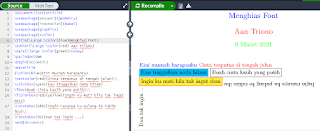
To rotate text, use \rotatebox from the graphicx package.
\rotatebox{45}{Rotated text}Example output for colored text, boxed text, and rotated text:
[
Closing
Typography control in is rich enough for both standard documents and more styled layouts. Once you understand font family, size, color, boxed text, and rotation, it becomes much easier to produce documents that look clear and polished.




