Proving the Area of a Triangle

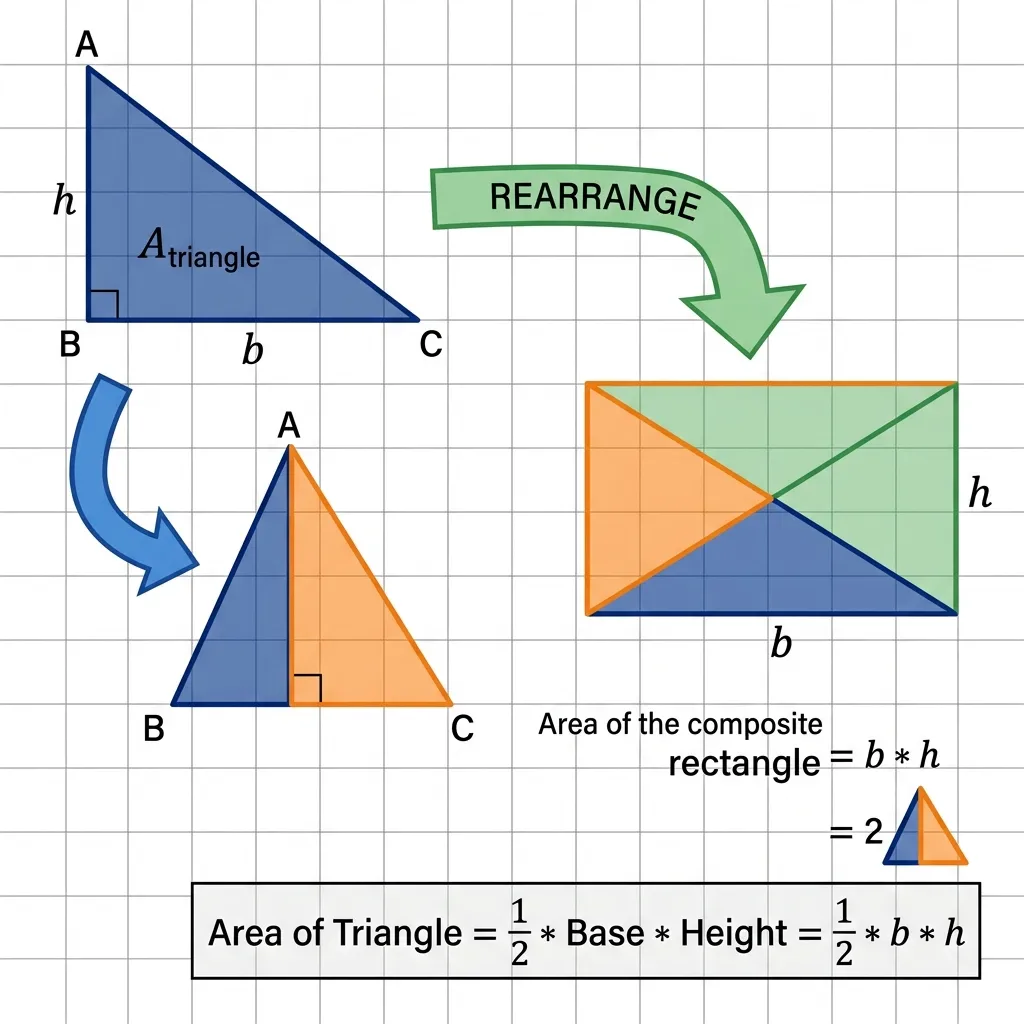
As is known, a triangle is a flat figure that has three sides and three angles, and the sum of the measures of the three angles is $180^0$. Also understand that to find the area of a triangle, use the formula:
\(L\ \Delta =\frac{1}{2}\ a\times t\)
Where did this formula come from? Is there a connection between triangles and quadrilaterals? In this article, I will provide a guide on how to prove the area of a triangle using the area of a quadrilateral using the GeoGebra application.

Steps to Prove the Area of a Triangle Using the Area of a Quadrilateral in GeoGebra
OK, just take a look at the following guide.
1. Open GeoGebra
Open the GeoGebra application on your computer or device.
2. Create a Slider/Launch
Click tools *Glide*, click anywhere on the Graphic Display and a box will appear, click Corner, fill in as below. Click OK. Look at the following image.

3. Create Two Triangles
Construct a triangle $ABC$. Click *Polygon*, click the three point positions in the Graph View and return to the starting point, then we get the triangle $ABC$. Create another triangle that coincides with triangle $ABC$ in the same way as above. Look at the following image.

4. Create the Midpoint of Side AB
Create the midpoint of side $AB$. Click the Midpoint or Center, click point $A$ and point $B$, then point $E$ appears.
5. Rotation of Triangle ABC about the Midpoint
To make triangle $ABC$ rotate about point $E$ clockwise. Click *Rotation of an Object around a Point with an Angle*, click on triangle $ABC$, click point $E$, then a box appears. Write with $\alpha$, select clockwise, click Ok. The result is the triangle $A'B'C'$.

6. Move the Rotation Result Triangle
Move triangle $A'B'C'$ using *glide*, so we get a quadrilateral.


7. Do the same for Triangle BCD
Do the same thing starting from step $4$ to step $6$ to make a rotation of triangle $BCD$ about the midpoint $BD$. Keep selecting the corner $\alpha$, so that it continues to use the slide that was created together. Look at the following image.


Conclusion on Proving the Area of a Triangle
It can be seen that the area of the triangle is equal to half the area of the quadrilateral.
\(\begin{aligned} \text{Length of rectangle} &= \text{length of base of triangle}\\ \text{width of rectangle} &= \text{height of triangle}\\ \text{Area of the triangle} &= \frac{1}{2}\text{of the length of the rectangle} \times \text{width of the rectangle}\\ &= \frac{1}{2}\times \text{base of triangle} \times \text{height of triangle} \end{aligned}\) ### 8. Enable AnimationSo that the image moves, then right click on the slide, click *Live Animation*.
Finally, trim the triangles, remove the axis lines, grids, and give the triangles and glides an attractive coloring.
The final result
Below is an example of a triangle that has been created, click **play icon** at the bottom left, or slide the slider to see the triangle change.
This is a guide on how to prove the area of a triangle using the area of a quadrilateral using the GeoGebra application. If there are errors, please correct them, if you don't understand, let's discuss. If you have input, please write a comment here, if you like, I will make another guide 😂. I hope this is helpful.