Skydiving Parachute

Contents
Drawing a Skydiving Parachute in LaTeX
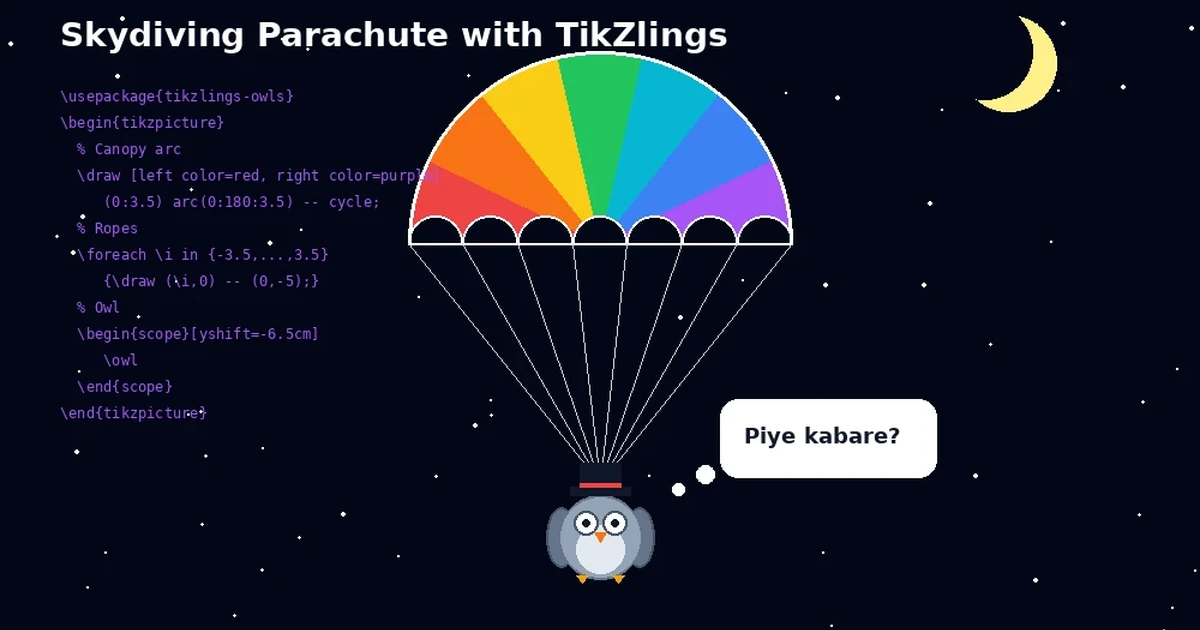
In this tutorial we will draw a skydiving parachute in LaTeX. The illustration has three main parts:
- the canopy made from circular arcs
- the suspension lines
- the small owl hanging below
The final result looks like this.

Step-by-Step TikZ Construction
Follow these steps.
Open your LaTeX editor.
Use the
standalonedocument class with a1cmborder.
\documentclass[border=1cm]{standalone}- Load the
tikzpackage.
\usepackage{tikz}- To draw the owl, load
tikzlings-owls.
\usepackage{tikzlings-owls}- Start the document body and the drawing environment.
\begin{document}
\begin{tikzpicture}- Draw the main canopy as a semicircle.
\draw (0:3.5) arc (0:180:3.5);The first result looks like this.

- Add the smaller arcs under the canopy to form the attachment points for the lines.
\draw (-3.5,0) arc (180:0:0.5);
\draw (-2.5,0) arc (180:0:0.5);
\draw (-1.5,0) arc (180:0:0.5);
\draw (-0.5,0) arc (180:0:0.5);
\draw (0.5,0) arc (180:0:0.5);
\draw (1.5,0) arc (180:0:0.5);
\draw (2.5,0) arc (180:0:0.5);
The result looks like this.

Steps 6 and 7 can be shortened into a single command:
\draw (0:3.5) arc (0:180:3.5)
  \foreach \i in {1,...,7}{arc (180:0:0.5)} -- cycle;
To color the canopy, add these options after \draw:
[left color=red!80,right color=green!80]The colored canopy looks like this.

- Draw the suspension lines.
\foreach \i in {-3.5,...,3.5} {
  \draw (\i,0) -- (0,-5);
}
The result looks like this.

- Place the owl below the lines.
\begin{scope}[yshift=-6.5cm]
  \owl
\end{scope}
The result looks like this.

- To make the owl look more playful, add a top hat.
\thing[tophat,scale=1.5,yshift=-0.6cm,xshift=-0.05cm]- Add a speech thought bubble as well.
\thing[think={\small How are you?},scale=1.5,yshift=-0.6cm,xshift=0.3cm]- Close the drawing and the document.
\end{tikzpicture}
\end{document}
The final result after compilation looks like this.

That is a simple step-by-step guide to drawing a skydiving parachute in LaTeX. For more TikZ drawing inspiration, you can also browse latexdraw.com.




