The Circle Illusion: Between Geometry and Visual Perception

This article explores how an arrangement of squares can form a rotating circular illusion using LaTeX and TikZ. We will examine the structure of the code, the visual principles behind the illusion, and its significance in perception and visual art.
Introduction
In the world of visual perception, optical illusions are fascinating phenomena that reveal how the human brain interprets visual information. One such illusion is the circle illusion, where simple geometric patterns can create the impression of motion or form that does not actually exist. This article explores how an arrangement of squares can form a rotating circular illusion using LaTeX and TikZ. We will examine the structure of the code, the visual principles behind the illusion, and its significance in perception and visual art.
LaTeX Source Code
The following image is generated using TikZ, a powerful LaTeX graphics library designed for mathematical and scientific illustrations.
\documentclass{standalone}
\usepackage{tikz}
\begin{document}

\begin{tikzpicture}
  \fill[color=black!40!white] (-6,-6) rectangle (6,6);
  \foreach \n/\r/\twist in {70/5/12,56/4/-12,42/3/12,28/2/-12}{
    \foreach \m in {1,3,...,\n}
      \draw [thick,color=white,shift={(360/\n*\m:\r)},rotate=\twist+360/\n*\m]
        (-.15,-.15) rectangle (.15,.15);
    \foreach \m in {2,4,...,\n}
      \draw [thick,color=black,shift={(360/\n*\m:\r)},rotate=\twist+360/\n*\m]
        (-.15,-.15) rectangle (.15,.15);
    }
\end{tikzpicture}

\end{document}
The output produced: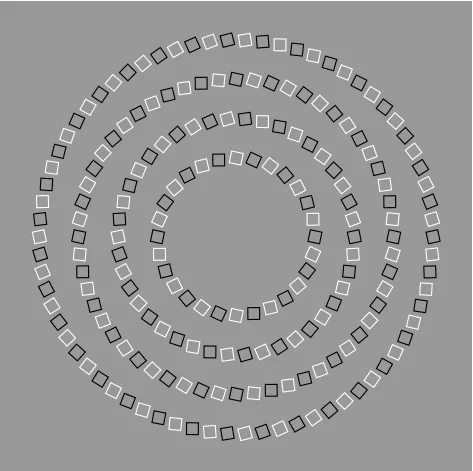
Code Structure Explanation
This section explains each component of the code so you can understand how the pattern is constructed step by step.
Document Class
\documentclass{standalone}The standalone class allows you to compile only the figure without page margins or text. This is ideal for creating diagrams or standalone graphics.
Loading the TikZ Package
\usepackage{tikz}TikZ (short for “TikZ ist kein Zeichenprogramm”) is a LaTeX library for vector graphics, providing precise control over shapes, colors, and geometric transformations.
TikZ Picture Environment
\begin{tikzpicture}
  ...
\end{tikzpicture}
All TikZ drawing commands are placed inside this environment. Within this block, we define all visual elements—background, shapes, colors, and loops.
Background
\fill[color=black!40!white] (-6,-6) rectangle (6,6);The \fill command fills a rectangular area with a color.
black!40!white means 40% black mixed with white, producing a neutral gray background.
Coordinates (-6,-6) to (6,6) define the drawing area.
This gray background enhances contrast between black and white squares.
Main Loop for Circular Layers
\foreach \n/\r/\twist in {70/5/12,56/4/-12,42/3/12,28/2/-12}{
  ...
}
This line defines the core structure of the pattern.
\n= number of squares in one ring\r= radius (distance from the center)\twist= rotation angle for each layer With four combinations, we get four concentric circular layers, each with a slightly different rotation. The alternating12and-12twist values make the outer and inner layers appear to rotate in opposite directions.
White Squares
\foreach \m in {1,3,...,\n}
  \draw [thick,color=white,shift={(360/\n*\m:\r)},rotate=\twist+360/\n*\m]
    (-.15,-.15) rectangle (.15,.15);
This loop draws white squares at odd positions (1, 3, 5, …). Explanation:
360/\n*\mdetermines each square’s angular position.shift={(...:\r)}places the square along the circle’s radius.rotate=\twist+360/\n*\msets the orientation of each square.- The coordinates define the square’s size centered at its position.
Black Squares
\foreach \m in {2,4,...,\n}
  \draw [thick,color=black,shift={(360/\n*\m:\r)},rotate=\twist+360/\n*\m]
    (-.15,-.15) rectangle (.15,.15);
This loop draws black squares in even positions, alternating with the white ones. The contrast between them is the foundation of the optical illusion.
Closing the Environment
\end{tikzpicture}
\end{document}
These commands close the TikZ and LaTeX document environments. The result is a symmetric composition of black and white square rings that appear to rotate when viewed carefully.
The Optical Illusion Explained
- Color Contrast — The alternating black and white squares cause high luminance contrast, triggering visual sensitivity in the retina.
- Gradual Rotation — The slightly different twist angles between layers create the illusion of counter-rotating rings.
- Microsaccades — Tiny involuntary eye movements make static patterns appear to move, reinforcing the illusion.
Experimenting with Parameters
You can modify several parameters to create new visual effects:
| Parameter | Description | Visual Impact |
|---|---|---|
\r | Circle radius | Changes ring size |
\n | Number of squares | Alters pattern density |
\twist | Rotation angle | Adjusts illusion direction and strength |
| Color | Other color pairs | Affects depth and vibrancy |
| Example modification: |
\foreach \n/\r/\twist in {60/5/10,50/4/-10,40/3/10,30/2/-10}{This creates a softer illusion with reduced contrast.
Conclusion
The circle illusion beautifully demonstrates how simple geometry and visual contrast can manipulate human perception. With TikZ, LaTeX becomes not only a scientific writing tool but also a creative medium bridging art, geometry, and psychology.
References
- Gregory, R. L. (1997). Eye and Brain: The Psychology of Seeing. Oxford University Press.
- Kitaoka, A. (2003). Rotating Snakes Illusion. Akiyoshi Kitaoka’s Optical Illusions.
- Ware, C. (2013). Information Visualization: Perception for Design. Morgan Kaufmann.
- The PGF/TikZ Manual, Version 3.1.10 (2023).
Written by: Aan Triono License: CC BY-SA 4.0