Writing Mathematical Formulas on Blogs

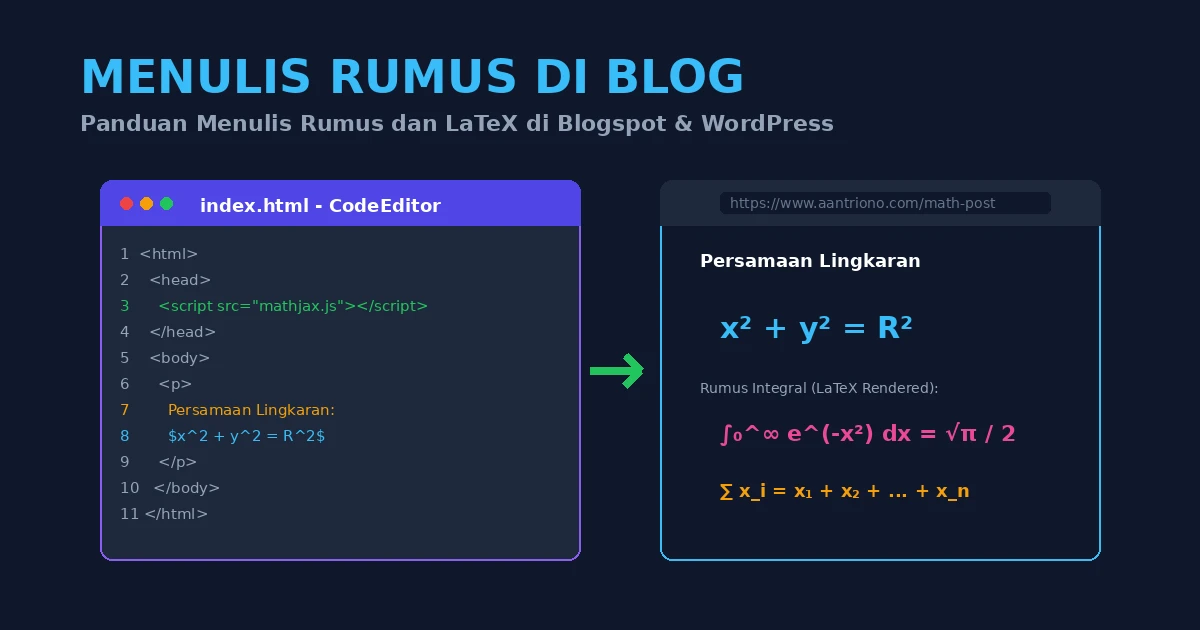
Introduction
Educational blogs, especially those about mathematics or accounting, almost always need symbols, notation, formulas, and equations. The problem is that Blogger does not provide a built-in equation editor like Microsoft Word.
Because of that, mathematical formulas on blogs are usually written in and then rendered by JavaScript libraries such as MathJax or KaTeX.
[

Instead of inserting formulas as screenshots, writing them directly with produces cleaner output and follows mathematical formatting much better.
General Workflow
The workflow is simple:
- write the formula in ,
- paste that code into the blog article,
- let MathJax or KaTeX render it.
Writing LaTeX Code
If you are not yet comfortable typing raw , you can use CodeCogs as a helper. It provides a visual formula editor and generates the corresponding code.
CodeCogs usually shows three main parts:
- a symbol toolbar,
- a input box,
- a preview area.
Example:
\frac{x^2+1}{x-3}Rendered result:
When copying from CodeCogs, it is better to copy the raw code instead of the image output. Then paste it into the blog in HTML mode or any editor mode that preserves backslashes correctly.
Common LaTeX Examples
Basic Arithmetic
| LaTeX Code | Result |
|---|---|
a+b | |
c-d | |
a\times b | |
c\div d |
Powers and Subscripts
Use ^ for exponents and _ for subscripts. If the exponent or subscript contains more than one character, wrap it in curly braces.
| LaTeX Code | Result |
|---|---|
a^b | |
a^{bc} | |
4x_a | |
x_{max}^2+x_{min}^2=1 |
Fractions
Use \frac for regular fractions and \dfrac for a larger display style.
| LaTeX Code | Result |
|---|---|
\frac{a}{b} | |
\dfrac{c}{d} | |
\frac{x-x_1^2}{a^2} | |
F=k\dfrac{Q_1Q_2}{R^2} |
Integrals
| LaTeX Code | Result |
|---|---|
y=\int (x+1)\ dx | |
y=\int_{0}^{\infty} f(x)\ dx | |
\iint f(x,y)\ dx\ dy | |
\oint |
Derivatives
| LaTeX Code | Result |
|---|---|
\dfrac{dy}{dx} | |
\dfrac{\partial z}{\partial x} |
Roots and Inequalities
| LaTeX Code | Result |
|---|---|
\sqrt{a} | |
\sqrt[n]{a} | |
y=\sqrt{\dfrac{x}{x^2+2x+1}} | |
a < b | |
a \le b | |
a > b | |
a \ge b |
Sigma and Pi Notation
| LaTeX Code | Result |
|---|---|
\sum_{i=1}^{n} x_i | |
\sum \limits_{i=1}^{n} x_i | |
\prod_{i=1}^{n} x_i | |
\prod\limits_{i=1}^{n} x_i |
Trigonometry
| LaTeX Code | Result |
|---|---|
\sin(x) | |
\cos(x) | |
\tan(x) | |
\alpha^\circ |
Matrices
Example:
\begin{bmatrix}
a & b \\
c & d
\end{bmatrix}
Result:
Aligned Equations
For multi-line equations, the align environment is very useful.
\begin{align}
y &= 2x+3 \\
y-3 &= 2x
\end{align}
Result:
Rendering with MathJax
If your blog does not yet have a math renderer, MathJax is one of the most common choices. The snippet below is a typical example used in older Blogger setups.
<script type="text/x-mathjax-config">
  MathJax.Hub.Config({
    tex2jax: {
      inlineMath: [['$','$'], ['\\(','\\)']],
      displayMath: [['$$','$$'], ['\\[','\\]']]
    }
  });
</script>
<script src="https://cdn.jsdelivr.net/npm/mathjax@2/MathJax.js?config=TeX-AMS-MML_HTMLorMML"></script>
For writing formulas:
- inline math can use
$ ... $or\( ... \), - display math can use
$$ ... $$or\[ ... \].
Rendering with KaTeX
KaTeX is usually lighter and faster. Example setup:
<link rel="stylesheet" href="https://cdn.jsdelivr.net/npm/katex@0.16.9/dist/katex.min.css">
<script defer src="https://cdn.jsdelivr.net/npm/katex@0.16.9/dist/katex.min.js"></script>
<script defer src="https://cdn.jsdelivr.net/npm/katex@0.16.9/dist/contrib/auto-render.min.js"></script>
<script>
  document.addEventListener("DOMContentLoaded", function () {
    renderMathInElement(document.body, {
      delimiters: [
        {left: "$$", right: "$$", display: true},
        {left: "$", right: "$", display: false},
        {left: "\\(", right: "\\)", display: false},
        {left: "\\[", right: "\\]", display: true}
      ]
    });
  });
</script>
MathJax or KaTeX?
In practice:
- MathJax is more flexible and highly compatible,
- KaTeX is faster and lighter,
- for most educational blogs, either one works well.
Practical Tips
Some recommendations:
- use real code instead of screenshots,
- test formulas in a draft before publishing,
- stay consistent with inline and display delimiters,
- avoid placing renderer scripts repeatedly inside article content,
- if your blog template already loads MathJax or KaTeX, the article only needs the formula code itself.
Closing
Writing mathematical formulas on a blog becomes straightforward once the workflow is clear: write the formula in , paste it into the article, and let MathJax or KaTeX render it. This produces much cleaner results than using formula screenshots and makes mathematics articles easier to read.