Drawing Mitsubishi Logo

Introduction
When it was founded in 1870 AD, Mitsubishi was a shipping company. The founder was Yataro Iwasaki (1834-1885). In 1873 the company changed its name to Mitsubishi Shokai. The name Mitsubishi itself is composed of two words, namely Mitsu And hishi which turned into bushi. Mitsu means* three* and bishi means under my lace. Therefore, the Mitsubishi logo is three rhombuses or three diamonds. So, on this occasion, I will not buy a Mitsubishi Xpander or Pajero, heeeee. But just sharing a tutorial on how to draw the Mitsubishi logo using in polar coordinates and in Cartesian coordinates 😂.
Drawing the Mitsubishi Logo in Polar Coordinates
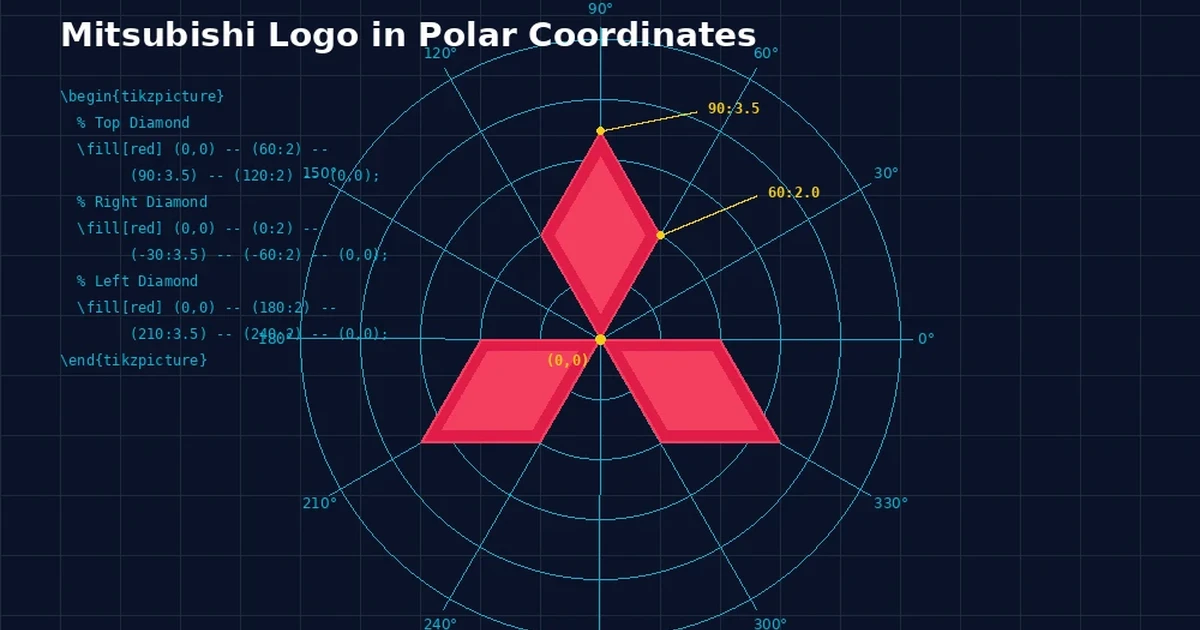
For the first Mitsubishi logo, we will use polar coordinates. The steps are as follows. PreambleIn the preamble section we determine the class of documents and packages required. For example as follows.\documentclass[border=0.2cm]{article}\usepackage{tikz}Document BodyIn the body of the document we start drawing using the tikz package commands starting with \begin{tikzpicture} and ending with \end{tikzpicture}. And the Mitsubishi logo that will be drawn is three diamonds. To make it easier we call them top diamonds, right diamonds, and left diamonds. Top Diamond% ~~~~~~~~~~~~~~ Berlian Atas ~~~~~~~~~~~~~~~~~\fill[red] (0,0) – (60:2) – (90:3.5) – (120:2) – (0,0);Right Diamond% ~~~~~~~~~~~~~ Berlian Kanan ~~~~~~~~~~~~~~~~~\fill[red] (0,0) – (0:2) – (-30:3.5) – (-60:2) – (0,0);Left Diamond% ~~~~~~~~~~~~~~ Berlian Kiri ~~~~~~~~~~~~~~~~~ \fill[red] (0,0) – (180:2) – (210:3.5) – (240:2) – (0,0);After all the code has been written and the document has been given a closing code, the manuscript is then compiled. The compilation results look like the following image. Changing ColorsIf you want to change the coloring of each diamond, or divide each diamond into two different colored parts, you can try the following code. Pay attention to the color codes written in the following command codes. You can use it or change it to another color. Top Diamond% ~~~~~~~~~~~~~ Berlian atas ~~~~~~~~~~~~~~~\fill[magenta] (0,0) – (60:2) – (90:3.5);\fill[teal] (0,0) – (120:2) – (90:3.5);Right Diamond% ~~~~~~~~~~~~ Berlian kanan ~~~~~~~~~~~~~~~ \fill[red] (0,0) – (0:2) – (-30:3.5); \fill[cyan] (0,0) – (-60:2) – (-30:3.5);Left Diamond% ~~~~~~~~~~~~~ Berlian Kiri ~~~~~~~~~~~~~~~ \fill[blue] (0,0) – (180:2) – (210:3.5); \fill[green] (0,0) – (240:2) – (30:-3.5);And the compilation results will look like the following image. Drawing the Mitsubishi Logo in Cartesian CoordinatesNow we will draw the Mitsubishi logo in Cartesian Coordinates. How? Follow the following guide. PreambleIn the preamble section we determine the class of documents and packages required. For example as follows.\documentclass{article}\usepackage[landscape, margin=1 cm]{geometry}\usepackage{tikz}Document BodyIn the body of the document we write the command to start drawing and determine the coordinates of each corner of the diamond. For example as follows.\begin{document}\begin{tikzpicture}[thick,scale=5]% ~~~~~~~~~~~ Menggambar titik koordinat ~~~~~~~~~ \coordinate (A) at (0, 0); \coordinate (B) at (1, 0); \coordinate (C) at (1.7, -0.9); \coordinate (D) at (0.6, -0.9); \coordinate (E) at (-1, 0); \coordinate (F) at (-1.7, -0.9); \coordinate (G) at (-0.6, -0.9); \coordinate (H) at (0.5, 0.85); \coordinate (I) at (0, 1.7); \coordinate (J) at (-0.5, 0.85); Next, we will connect the coordinate points and color them to form three diamonds using the following command.%————- Menggambar Logo Mitsubishi ———– \fill[red, very thick] (A) – (B)–(C)–(D)–(A); \fill[red, very thick] (A) – (E)–(F)–(G)–(A); \fill[red, very thick] (A) – (H)–(I)–(J)–(A);\end{tikzpicture}\end{document}After all the code has been written and the document has been given a closing code, the manuscript is then compiled. The compilation results look like the following image. Complete CodeBelow is the complete code for drawing the Mitsubishi logo in polar coordinates and Cartesian coordinates. Polar Coordinates\documentclass[border=0.2cm]{article}\usepackage{tikz}\title{Logo Mitsubishi}\author{Aan Triono}\date{\today}\begin{document}\maketitle\centering\begin{tikzpicture}% ~~~~~~~~~~~~~~ Berlian Atas ~~~~~~~~~~~~~~~~~\fill[red] (0,0) – (60:2) – (90:3.5) – (120:2) – (0,0);% ~~~~~~~~~~~~~ Berlian Kanan ~~~~~~~~~~~~~~~~~ \fill[red] (0,0) – (0:2) – (-30:3.5) – (-60:2) – (0,0);% ~~~~~~~~~~~~~~ Berlian Kiri ~~~~~~~~~~~~~~~~~ \fill[red] (0,0) – (180:2) – (210:3.5) – (240:2) – (0,0); \end{tikzpicture}\end{document}Different Color Polar Coordinates\documentclass[border=0.2cm]{article}\usepackage{tikz}\title{Logo Mitsubishi}\author{Aan Triono}\date{\today}\begin{document}\maketitle\centering\begin{tikzpicture}% ~~~~~~~~~~~~~ Berlian atas ~~~~~~~~~~~~~~~\fill[magenta] (0,0) – (60:2) – (90:3.5);\fill[teal] (0,0) – (120:2) – (90:3.5);% ~~~~~~~~~~~~~ Berlian Kiri ~~~~~~~~~~~~~~~ \fill[blue] (0,0) – (0:-2) – (210:3.5); \fill[green] (0,0) – (240:2) – (30:-3.5);% ~~~~~~~~~~~~ Berlian kanan ~~~~~~~~~~~~~~~ \fill[red] (0,0) – (0:2) – (-30:3.5); \fill[cyan] (0,0) – (-60:2) – (-30:3.5); \end{tikzpicture}\end{document}Cartesian coordinatescumentclass{article}\usepackage[landscape, margin=1 cm]{geometry}\usepackage{tikz}\title{Logo Mitsubishi}\author{Aan Triono}\date{\today}\begin{document}\maketitle\centering\vspace{.3 cm}\begin{tikzpicture}[thick,scale=5]% ~~~~~~~~~~~ Menggambar titik koordinat ~~~~~~~~~ \coordinate (A) at (0, 0); \coordinate (B) at (1, 0); \coordinate (C) at (1.7, -0.9); \coordinate (D) at (0.6, -0.9); \coordinate (E) at (-1, 0); \coordinate (F) at (-1.7, -0.9); \coordinate (G) at (-0.6, -0.9); \coordinate (H) at (0.5, 0.85); \coordinate (I) at (0, 1.7); \coordinate (J) at (-0.5, 0.85); %————- Menggambar Logo Mitsubishi ———– \fill[red, very thick] (A) – (B)–(C)–(D)–(A); \fill[red, very thick] (A) – (E)–(F)–(G)–(A); \fill[red, very thick] (A) – (H)–(I)–(J)–(A); \end{tikzpicture}\end{document}You can try writing it using the engine available on this blog and immediately see the results. How to? Copy all the code above and paste it here. Closing
These are the steps for drawing the Mitsubishi logo using both in polar coordinates and in Cartesian coordinates. If there are errors, please correct them, and if you have input, please write them here. I hope this is helpful.




