How to Write LaTeX Using Overleaf


Writing LaTeX with Overleaf.com
One of the easiest ways to write online is to use Overleaf. This guide shows the basic flow: create an account, start your first project, and compile your document.
Registration and Initial Setup
1. Open the Overleaf website
Visit https://www.overleaf.com/.
[

2. Click Register
You will be taken to the registration page.
[
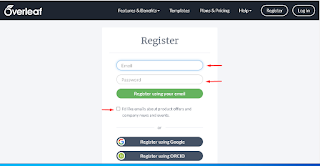
Enter your email address and password, then click Register using your email. After that, confirm the account from the verification email.
Creating Your First Project
3. Click Create First Project
After signing in, Overleaf will prompt you to create your first project.
[

4. Choose Blank Project
For a fresh start, select the blank project option.
[

5. Name the project
Type a project name that matches your document or task.
[

Writing and Compiling the Document
6. Start writing and click Recompile
The editor appears on the left side, while the compiled output appears on the right. After writing text or commands, click Recompile to see the updated result.
[

Overleaf Menus and Features
7. Understand the main editor controls
The image below highlights the main controls that are commonly used when working in Overleaf.
[

Reference:
- Main menu button.
- Return to the project dashboard.
New Fileto create a new file.New Folderto create a new folder.Uploadto upload files.Renameto rename a file or project.Deleteto remove a file.- The main document name with the
.texextension. - Change tracking for the document.
- Share the project by email.
- Send the document to another service.
- Project history.
- Collaboration chat.
- Full-screen document view.
- Download the document.
- Build notifications.
Recompilebutton.- Fit the document to page width.
- Fit the document to page height.
- Zoom in.
- Zoom out.
Practical Tips
After editing the document, get used to pressing Recompile often so you can catch errors quickly.
- Yellow warnings usually indicate minor issues and can often be ignored temporarily.
- Red warnings usually indicate fatal errors that must be fixed before the document compiles properly.
- To leave Overleaf, open the account menu and choose
Logout.
That is the basic workflow for writing with Overleaf. Once you are comfortable with the editor, you can continue with packages, images, tables, and mathematical notation.




