How to Draw Circle Elements

Drawing Circle Elements with LaTeX
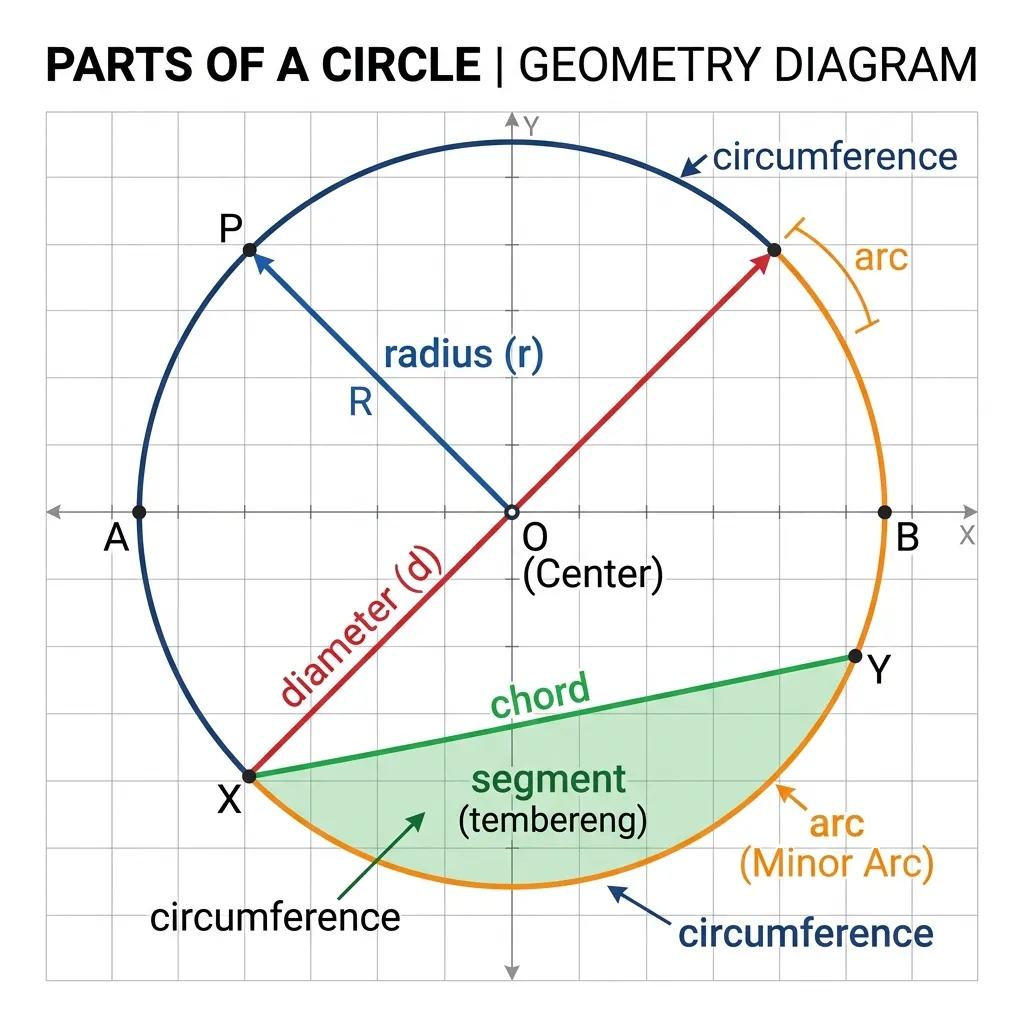
As mentioned in the previous post, a circle is a simple closed curve that represents the locus of points at the same distance from a fixed point. That fixed point is called the center of the circle. Circle material is usually studied in grade VIII. At the beginning, students are introduced to the definition of a circle and its elements, as shown in the following figure.

Circle Elements
As shown in the figure, the circle is placed inside a framed box. To create that frame, you can refer to the article about color box.
The elements of the circle shown there are:
- center,
- radius,
- diameter,
- sector,
- arc,
- chord,
- apothem.
Guide to Drawing Circle Elements
Then how do you draw the circle elements as seen in the image in LaTeX? Check out the following guide.
1. Preparation of Initial Packages and Orders
Include the following packages and commands in the preamble to the document.
\usepackage{enumitem}
\usepackage[tikz,blur]{bclogo}
\usetikzlibrary{calc,patterns,angles,quotes}
\usepackage[many]{tcolorbox} %--- Paket yang dibutuhkan untuk membuat color box ---
\usepackage{amsmath,amssymb}
\newtcolorbox{myfancybox}[1]{breakable,enhanced jigsaw,colback=blue!20,colframe=red,top=20pt,overlay unbroken= {\node[fill=blue,text=yellow] at (frame.east) {$\clubsuit$};},
%--- Bagian untuk mengubah pewarnaan color box ---
attach boxed title to top left={xshift=75pt,yshift=-7pt}, %--- Bagian untuk mengubah posisi judul ---
boxed title style={size=small,colback=blue,colframe=red},
title=#1} %--- Bagian untuk mengubah pewarnaan judul ---
\newcommand{\siku}[4][.3cm]
{\coordinate (tempa) at ($(#3)!#1!(#2)$);
 \coordinate (tempb) at ($(#3)!#1!(#4)$);
\coordinate (tempc) at ($(tempa)!0.5!(tempb)$);
\draw[blue] (tempa) -- ($(#3)!2!(tempc)$) -- (tempb);}
\begin{document}
\noindent Perhatikan gambar lingkaran berikut ini.
\begin{myfancybox}{\color{yellow}\textbf{UNSUR-UNSUR LINGKARAN}}
\newcommand\rad{4} % Membuat busur lingkaran ---
2. Create auxiliary lines
Next, in the body of the document to make it easier to draw, first create auxiliary lines.
\draw[step=1cm,gray,very thin] (-5,-5) grid (5,5);3. Create Coordinate Axes
Next, create the x-axis and y-axis lines using the following command.
\draw[thick,<->] (-5,0) -- (5,0)node[anchor=north west] {$X$};
\draw[thick,<->] (0,-5) -- (0,5)node[anchor=south east] {$Y$};
4. Create a Scale on the Axis
Then create the x-axis and y-axis values using the following command
\foreach \x in {-5,-4,-3,-2,-1,1,2,3,4,5}
   \draw (\x cm,1pt) -- (\x cm,-1pt)node[anchor=north] {$\x$};
\foreach \y in {-5,-4,-3,-2,-1,1,2,3,4,5}
   \draw (1pt,\y cm) -- (-1pt,\y cm) node[anchor=east] {$\y$};
5. Drawing Circles
It’s time to draw a circle with a radius of 4 units via the following command.
\draw [line width=1pt] circle (4);The results from steps one to five look like the following image.

6. Determine Coordinate Points
Next, create the center point of the circle using the following command.
\draw [fill=blue] circle (3pt);It’s a good idea to first create the coordinate points that will be used to draw the radius, diameter, chord, chord and apothem. These points are exampled as follows.
\coordinate [label=above:$\textbf{A}$] (A) at (-3,2.8);
\coordinate [label=left:$\textbf{B}$] (B) at (-4,0);
\coordinate [label=right: $\textbf{C}$] (C) at (4,0);
\coordinate [label=above:$\textbf{D}$] (D) at (0,4);
\coordinate [label=right:$\textbf{E}$] (E) at (2.8,3);
\coordinate [label=below:$\textbf{F}$] (F) at (0,-4);
\coordinate [label=left:$\textbf{G}$] (G) at (2,-2);
\coordinate [label=below:$\textbf{H}$] (H) at (3,-3);
7. Draw the Fingers
Then from the center of the circle we will create radius OA via the following command.
\draw [line width=1.5pt,red] (0,0) -- (-2.8,2.8);8. Drawing Diameter
Next, to create a diameter, for example diameter BC, use the following command.
\draw [line width=1.5pt,red] (-4,0) -- (4,0);
\coordinate [label=left:$\textbf{B}$] (B) at (-4,0);
\coordinate [label=right: $\textbf{C}$] (C) at (4,0);
9. Drawing Slopes and Angles
Next we will draw a circular mesh, for example an ODE mesh drawn using the following command.
\filldraw[black,fill=red!85] (O)--(D) node[above,pos=0.5] {} arc (90:45:4) -- cycle;In the ODE mesh, we will create an angle, for example called angle . The command to write the angle is as follows.
\pic[draw=blue,angle radius=.7cm,pic text=$\alpha$,angle eccentricity=.65]{angle={E--O--D}};10. Drawing Bowstrings
Next, draw the CF chord, this chord is needed to create the apothem and segment lines. The CF chord is drawn using the following command.
\draw [line width=1.5pt,red] (0,-4) -- (4,0);11. Drawing Apothem
Next draw the OG apothem. So from the center point of the circle O(0,0) we will draw a line perpendicular to the chord CF. The command is as follows.
\draw [line width=1.5pt,blue] (0,0) -- (2,-2);And, because the apothem OG is perpendicular to the chord CF, to create a right angle sign at G, we make the following command.
\siku{C}{G}{O}12. Drawing Sections
Next is drawing the sections. A segment is an area bounded by a chord and a circular arc. For example, the section created is the CFH section. The drawing command is as follows.
\filldraw[black,fill=green!85] (C)--(F) node[above,pos=0.5] {} arc (-90:0:4) -- cycle;13. Drawing a Circle Arc
Next is to draw circular arcs AB, BF, CF, CE, and BF. To draw a BD arc, use the following command.
\draw[line width=2pt, green] (-\rad,0) arc (180:90:\rad);To draw a BF arc, use the following command.
\draw[line width=2pt, cyan] (0,-\rad) arc (270:180:\rad);To draw a CF arc, use the following command.
\draw[line width=2pt, magenta] (0,-\rad) arc (-90:0:\rad);Please continue to draw the CD arc 😀. Now you can see the results of steps one to step thirteen as in the following image.

Final Results and Usage Examples
Finally we will remove the auxiliary lines, the x and y axis lines, as well as the x and y axis coordinate values. You can delete the command directly or insert a % sign in front of the command, so that it is not read by LaTeX. Look at the following image.
 If you are an educator and want to use the figure as worksheet material, you can add a few questions about circle elements below the image.
This is a guide to drawing circle elements using LaTeX. If any part needs correction or clarification, please leave a note in the comments.




