How to Draw Yin and Yang Symbols


Drawing Yin and Yang Symbol in LaTeX
Following from wikipedia, Yin and Yang are concepts in Chinese philosophy that usually describe the nature of the interconnected and opposing forces in this world and how they mutually build on each other. On this occasion, I will not discuss the meaning of Yin and Yang in life, but will discuss how to draw the Yin and Yang symbols using LaTeX. 
Step-by-Step TikZ Construction
OK, let’s go straight to the text editor, either online or offline.
Open your text editor.
Create a new project.
As usual, to draw, you need a TikZ package and include it in the preamble.
\documentclass{article}\usepackage{tikz}- Next, in the body of the document, write the following command.
\begin{tikzpicture}\end{tikzpicture}- Then we will create a circle with a radius of 1 cm using the following command.
\draw (0,0) circle (1cm);- As seen in the picture above there are black and white parts. We will divide the circle formed into two parts, each black and white using the following command.
\begin{scope} \clip (0,0) circle (1cm); \fill[black] (0cm,1cm) rectangle (-1cm, -1cm); \end{scope}The results of these steps look like the following image.

- Next we will draw the head using the following command.
\fill[black] (0,0.5) circle (0.5cm); \fill[white] (0,-0.5) circle (0.5cm);The results of these steps look like the following image.
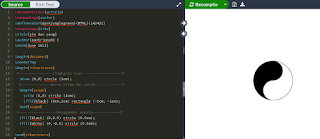
- Next we will draw the eyes using the following command.
\fill[white] (0,0.5) circle (0.1cm); \fill[black] (0,-0.5) circle (0.1cm);- If the commands you write in the text editor are in accordance with the commands above then after you compile them an image will definitely be formed like the first image above. The result is the same as the following image.
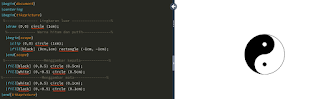
The image of Yin and Yang above is in a vertical position, what if the image were in a horizontal position? Look at the following image.

The steps are as follows.
Open your text editor.
Create a new project.
As usual, to draw, you need a TikZ package and include it in the preamble.
\documentclass{article}\usepackage{tikz}- Next, in the body of the document, the first image we create is a circle using the following command.
\draw[thick] (0,0) circle (3)- Then we will draw the head, this head is an arc starting from coordinates (-3, 0) via the following command.
(-3,0) arc (180:360:1.5) arc (180:0:1.5)- Then to draw the eyes, we will create two small circles using the following command.
(1.5,0) circle (.5) (-1.5,0) circle (.5);The results of the steps above look like the following image.

- Next, we will color the image that has been created. Here we will color the head and eyes in one part black using the following command.
\fill[even odd rule] (1.5,0) circle (.5) (-3,0) arc (180:360:3) arc (0:180:1.5) arc (360:180:1.5) (-1.5,0) circle (.5);Of course you can give it a different color from the original color, you can use red, blue, yellow, green or other colors. The way to do this is to write the color you want before the text “even odd rule”, for example the color chosen is blue, then the text will be \fill[blue, even odd rule] …
- Once you have finished with all the steps above, it’s time to compile the script you created and see the results. Is it the same as the following picture.

So we have applied it step by step in drawing the Yin and Yang symbols using LaTeX. If there are errors, please correct them, if you have input, please write them here. I hope this is helpful. Reference: www.latexdraw.com




