How to Draw a Cup of Coffee Using LaTeX

Introduction
In this article, I will share an article about how to draw a cup of coffee using . Yup… a cup of coffee is usually served and enjoyed in the morning to start activities, in the afternoon when resting, or even served in the evening to accompany staying up late, heeee. OK, let’s go straight to the tutorial on how to draw a cup of coffee using the word processor .
Preamble
In the preamble, we type commands about the document class and packages needed to draw the cup of coffee.
\documentclass{article}\usepackage{tikz}\usetikzlibrary{fadings}\tikzfading[name=fade out, inner color=transparent!0, outer color=transparent!100]Document Body
In the body of the document, we will draw the parts consisting of the cup base, cup, cup handle, and coffee water. Here all parts of the image are light blue.
\begin{document}\begin{tikzpicture} \foreach \c [count=\i from 0] in {blue!25}{ \tikzset{xshift={mod(\i,2)*3cm}, yshift=-floor(\i/2)*3cm} \colorlet{cup}{\c} }\end{tikzpicture}\end{document}Cup base
First, we draw a cup base shaped like a circle with a depression in the center for the cup.
\begin{scope}[shift={(0,-1-1/16)}] \fill [black!87.5, path fading=fade out] (0,-2/8) ellipse [x radius=6/4, y radius=3/4]; \fill [cup, postaction={left color=black, right color=white, opacity=1/3}] (0,0) ++(180:5/4) arc (180:360:5/4 and 5/8+1/16); \fill [cup, postaction={left color=black!50, right color=white, opacity=1/3}] (0,0) ellipse [x radius=5/4, y radius=5/8]; \fill [cup, postaction={left color=white, right color=black, opacity=1/3}] (0,1/16) ellipse [x radius=5/4/2, y radius=5/8/2]; \fill [cup, postaction={left color=black, right color=white, opacity=1/3}] (0,0) ellipse [x radius=5/4/2-1/16, y radius=5/8/2-1/16]; \end{scope} Cup
The cup is placed right in the middle of the cup base so that it covers the hollow area in the cup base.
\fill [cup!25!black, path fading=fade out] (0,-1-1/16) ellipse [x radius=3/4, y radius=1/3]; \fill [cup, postaction={left color=black, right color=white, opacity=1/3/2}, postaction={bottom color=black, top color=white, opacity=1/3/2}] (-1,0) arc (180:360:1 and 5/4); \fill [cup, postaction={left color=white, right color=black, opacity=1/3}] (0,0) ellipse [x radius=1, y radius=1/2]; \fill [cup, postaction={left color=black, right color=white, opacity=1/3/2}, postaction={bottom color=black, top color=white, opacity=1/3/2}] (0,0) ellipse [x radius=1-1/16, y radius=1/2-1/16];Cup handle
The cup handle is located to the right of the cup, starting from the center to the top of the cup.
\begin{scope}[shift=(10:7/8), rotate=-30, yslant=1/2, xslant=-1/8] \fill [cup, postaction={top color=black, bottom color=white, opacity=1/3}] (0,0) arc (130:-100:3/8 and 1/2) -- ++(0,1/4) arc (-100:130:1/8 and 1/4) -- cycle; \fill [cup, postaction={top color=white, bottom color=black, opacity=1/3}] (0,0) arc (130:-100:3/8 and 1/2) -- ++(0,1/32) arc (-100:130:1/4 and 1/3) -- cycle; \end{scope}Coffee water
The color of the coffee water here is a combination of black and brown, with a color composition adjusted to our wishes.
\begin{scope} \clip ellipse [x radius=1-1/16, y radius=1/2-1/16]; \fill [brown!10!black] (0,-1/4) ellipse [x radius=3/4, y radius=3/8]; \fill [brown!40!black, path fading=fade out] (0,-1/4) ellipse [x radius=3/4, y radius=3/8]; \end{scope}You can change the color of the coffee water by adjusting the coloration level brown And *black. *
Complete Code
If you want to try compiling a coffee cup drawing document script using , please copy the following code.
\documentclass{article}\usepackage{tikz}\usetikzlibrary{fadings}\tikzfading[name=fade out, inner color=transparent!0, outer color=transparent!100]\begin{document}\begin{tikzpicture} \foreach \c [count=\i from 0] in {blue!25}{ \tikzset{xshift={mod(\i,2)*3cm}, yshift=-floor(\i/2)*3cm} \colorlet{cup}{\c} % ~~~~~~~~~ Menggambar alas cangkir ~~~~~~~~~~~~~ \begin{scope}[shift={(0,-1-1/16)}] \fill [blue!87.5, path fading=fade out] (0,-2/8) ellipse [x radius=6/4, y radius=3/4]; \fill [cup, postaction={left color=black, right color=white, opacity=1/3}] (0,0) ++(180:5/4) arc (180:360:5/4 and 5/8+1/16); \fill [cup, postaction={left color=black!50, right color=white, opacity=1/3}] (0,0) ellipse [x radius=5/4, y radius=5/8]; \fill [cup, postaction={left color=white, right color=black, opacity=1/3}] (0,1/16) ellipse [x radius=5/4/2, y radius=5/8/2]; \fill [cup, postaction={left color=black, right color=white, opacity=1/3}] (0,0) ellipse [x radius=5/4/2-1/16, y radius=5/8/2-1/16]; \end{scope} % ~~~~~~~~~~~~ Menggambar gagang cangkir ~~~~~~~~~~~~~~~~~~ \begin{scope}[shift=(10:7/8), rotate=-30, yslant=1/2, xslant=-1/8] \fill [cup, postaction={top color=black, bottom color=white, opacity=1/3}] (0,0) arc (130:-100:3/8 and 1/2) -- ++(0,1/4) arc (-100:130:1/8 and 1/4) -- cycle; \fill [cup, postaction={top color=white, bottom color=black, opacity=1/3}] (0,0) arc (130:-100:3/8 and 1/2) -- ++(0,1/32) arc (-100:130:1/4 and 1/3) -- cycle; \end{scope} % ~~~~~~~~ Menggambar cangkir ~~~~~~~~~~~~~~ \fill [cup!25!black, path fading=fade out] (0,-1-1/16) ellipse [x radius=3/4, y radius=1/3]; \fill [cup, postaction={left color=black, right color=white, opacity=1/3/2}, postaction={bottom color=black, top color=white, opacity=1/3/2}] (-1,0) arc (180:360:1 and 5/4); \fill [cup, postaction={left color=white, right color=black, opacity=1/3}] (0,0) ellipse [x radius=1, y radius=1/2]; \fill [cup, postaction={left color=black, right color=white, opacity=1/3/2}, postaction={bottom color=black, top color=white, opacity=1/3/2}] (0,0) ellipse [x radius=1-1/16, y radius=1/2-1/16]; % ~~~~~~~~~~~~ Menggambar air kopi ~~~~~~~~~~~~~~~ \begin{scope} \clip ellipse [x radius=1-1/16, y radius=1/2-1/16]; \fill [brown!10!black] (0,-1/4) ellipse [x radius=3/4, y radius=3/8]; \fill [brown!40!black, path fading=fade out] (0,-1/4) ellipse [x radius=3/4, y radius=3/8]; \end{scope} }\end{tikzpicture}\end{document}Next, input the code into the LaTeX engine on this blog in the LaTeX Engine tools here
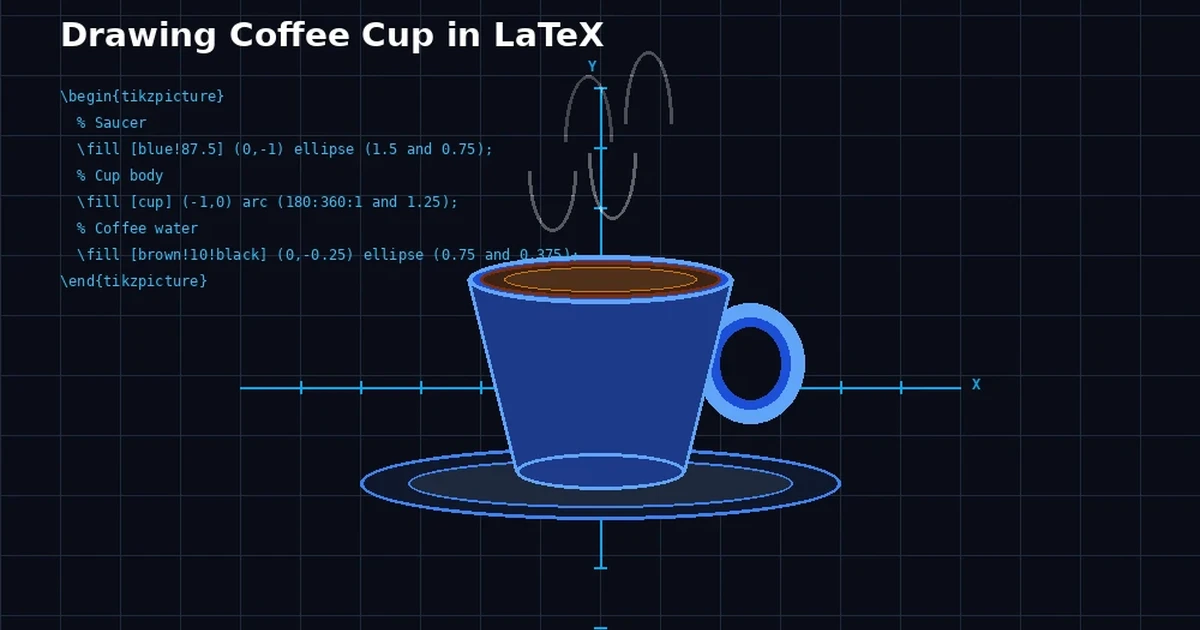
.The compiled results of writing these commands in will look like the following image. 
Closing
These are the steps for drawing a cup of coffee using LaTeX. Of course you can change and adjust the shape or coloring. I hope this is helpful.Reference: texample.net




