Creating a 2026 Circular Year Calendar using the TikZ Calendar Library in LaTeX


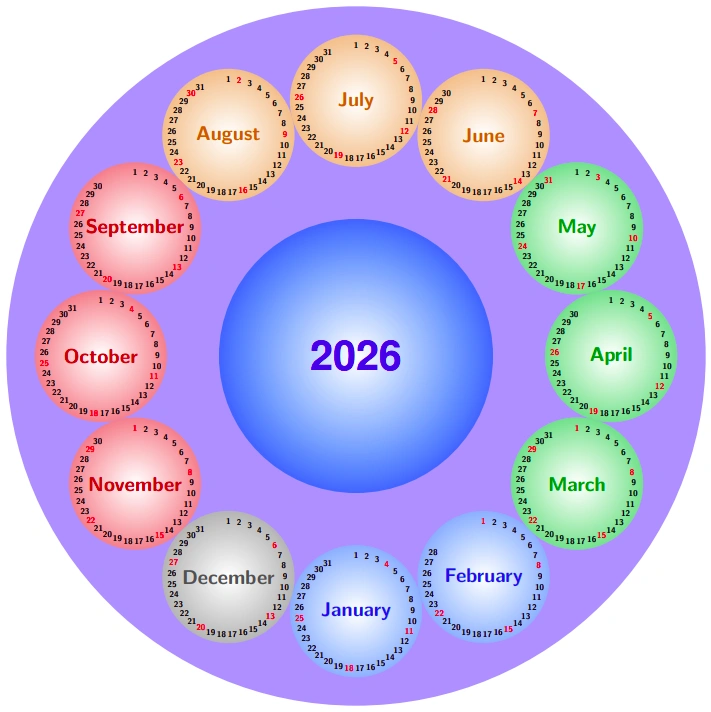
This article explores design techniques for creating a 2026 circular infographic calendar using the calendar and shadings libraries in LaTeX TikZ.
Introduction
Traditional wall or desk calendars typically rely on rigid, square 12-month table grids. However, by taking advantage of LaTeX’s TikZ package and its built-in calendar library, we can craft an artistic circular infographic calendar.
Originally conceived by Till Tantau (author of PGF/TikZ) and refined by Stefan Kottwitz, this layout features a prominent central year node surrounded by 12 radial month circles.
In this guide, all dates and day-of-the-week calculations are tailored specifically for the Year 2026 (where January 1, 2026 falls on a Thursday, February 2026 has 28 days, etc.).
LaTeX Source Code (Year 2026)
Here is the complete code customized for the Year 2026:
% A calendar of circles - Year 2026
% Author: Till Tantau (The PGF manual)
% Modifications: Stefan Kottwitz & Cleanups
\documentclass{article}
\usepackage{tikz}
\usepackage[active,tightpage]{preview}
\PreviewEnvironment{tikzpicture}
\setlength\PreviewBorder{5pt}%
\usetikzlibrary{calendar,shadings}
% Default Sans-Serif Font
\renewcommand*{\familydefault}{\sfdefault}
% 4-Season Color Scheme
\colorlet{winter}{blue!60!cyan}
\colorlet{spring}{green!60!black}
\colorlet{summer}{orange!85!black}
\colorlet{fall}{red!80!black}
% TeX Counter for Radial Angle Computation
\newcount\mycount
% Set Target Year to 2026
\year=2026
\begin{document}
\begin{tikzpicture}[every day/.style={anchor=mid,font=\tiny\bfseries}]
  % 1. Lingkaran Besar Paling Luar - DIUBAH MENJADI BIRU SOLID
  \fill[blue!35] (0,0) circle (7.4cm);
  % 2. Lingkaran Gradasi di Tengah (Biru di pinggir, putih di pusat)
  \draw[shading=radial, outer color=blue!60!cyan!80, inner color=white, draw=none] (0,0) circle (2.9cm);
  % 3. Teks Tahun "2026" tepat di Pusat
  \node[circle, draw=none, font=\fontfamily{phv}\selectfont\Huge\bfseries] at (0,0)
    {\textcolor{blue!90!black}{\the\year}};
  % 4. Loop Melalui 12 Bulan dengan Gradasi Lembut (Putih di Tengah Bulan)
  \foreach \month/\monthcolor/\monthname in {
    1/winter/January, 2/winter/February, 3/spring/March, 4/spring/April, 5/spring/May, 6/summer/June,
    7/summer/July, 8/summer/August, 9/fall/September, 10/fall/October, 11/fall/November, 12/gray!70!black/December
  } {
    % Hitung posisi sudut radial (Januari di posisi jam 6 / -90 derajat)
    \mycount=\month
    \advance\mycount by -1
    \multiply\mycount by 30
    \advance\mycount by -90
    % Koordinat pusat lingkaran bulan
    \coordinate (M) at (\the\mycount:5.4cm);
    % Gambar Lingkaran Bulan (Gradasi memudar dari luar ke dalam putih)
    \shadedraw[shading=radial,
               outer color=\monthcolor!45!white,
               inner color=white,
               draw=none]
      (M) circle(1.4cm);
    % Cetak Nama Bulan Tepat di Pusat Lingkaran Kecil yang Putih
    \node[font=\large\sffamily\bfseries, color=\monthcolor!90!black] at (M) {\monthname};
    % Plot Angka Kalender 2026 mengelilingi nama bulan
    \calendar at (M) [
      dates=\the\year-\month-01 to \the\year-\month-last
    ]
    if (Sunday) [red] % PENTING: pakai kurung SIKU, bukan kurung kurawal,
                       % supaya "red" dibaca sebagai opsi warna TikZ,
                       % bukan sebagai kode TeX biasa.
    if (all) {
      % Mengatur rotasi penempatan tanggal agar melingkar pas
      \mycount=1
      \advance\mycount by -\pgfcalendarcurrentday
      \multiply\mycount by 11
      \advance\mycount by 90
      \pgftransformshift{\pgfpointpolar{\mycount}{1.2cm}}
    };
  }
\end{tikzpicture}
\end{document}
Output Produced (2026 Calendar)
The resulting graphical output renders a stunning circular calendar for 2026:
Detailed Code Analysis & Logic
1. The calendar Library & 2026 Date Calculations
TikZ’s calendar library automatically computes weekday alignment for any given month in 2026:
dates=2026-\month-01 to 2026-\month-lastThe engine automatically handles:
- January 2026 starting on a Thursday with 31 days.
- February 2026 having 28 days (non-leap year).
- Highlighting all Sundays in red via
if (Sunday) [red].
2. 4-Season Color Palette
Month background shading is grouped by season:
- Winter: Blue (
blue) for months 1 (Jan), 2 (Feb), and 12 (Dec). - Spring: Deep Green (
green!60!black) for months 3 (Mar), 4 (Apr), and 5 (May). - Summer: Warm Orange (
orange) for months 6 (Jun), 7 (Jul), and 8 (Aug). - Fall: Rich Red (
red) for months 9 (Sep), 10 (Oct), and 11 (Nov).
3. Radial Distribution of 12 Months
Each month node is positioned at a radius of from the origin at increments ():
4. Circular Ring Alignment of Day Numbers
Inside each month node, day numbers () are arranged in a ring at radius using polar transforms:
TikZ Experimentation
Try these modifications to customize your calendar:
- Highlighting Holidays / Special Dates:
Add conditional styling inside the
\calendaroptions, for example:if (equals=2026-12-25) [red, font=\bfseries] % Christmas Day - Custom Color Gradients: Experiment with different color themes such as pastel or dark mode palettes.
Conclusion
The calendar library in TikZ LaTeX offers a powerful engine for building automated, custom-tailored calendars for 2026. Combining automated date calculations with radial shading yields a premium infographic graphic.
References
- Till Tantau & Stefan Kottwitz, A calendar of circles, TeXample.net
- Till Tantau, The TikZ and PGF Manual (Calendar Library), v3.1.10, 2024.
Written by: Aan Triono
License: CC BY-SA 4.0